Workflow Limits sets how much the workflows of your workspace may spend on AI. Open it via Budgets & limits in the Workflows sidebar. The entry is only shown to people whose role may manage billing, because raising a budget is a money decision.
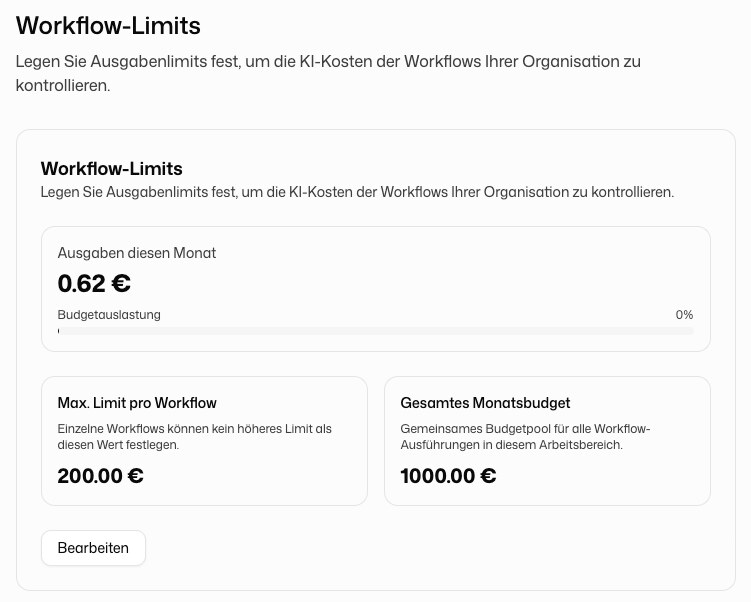
What the Page Shows
- Current Month Spending: what all workflows have cost so far this month
- Budget Usage: the share of the total monthly budget already used. The bar changes color from 80 percent and when the budget is used up
- Max Limit per Workflow: the ceiling for each workflow's own monthly cost limit
- Total Monthly Budget: a shared pool for all workflow runs in the workspace
Changing the Limits
Click Edit, enter the amounts in euros and click Save. Leave a field empty to remove the value you set.
| Limit | Effect |
|---|---|
| Max Limit per Workflow | No workflow can set Max. cost per month in its workflow settings higher than this. Empty means no ceiling |
| Total Monthly Budget | Once all workflows together have spent this amount in the month, new runs are refused until the next month |
Without a value of your own, the total monthly budget is €1,000 per month, even though the page shows No limit. Enter a higher amount if your workflows need more.
How the Limits Fit Together
Each workflow has its own limits in its settings: by default €50 per month and €5 per run. The organization ceiling caps how high those may go, and the total budget caps all workflows together. Whichever limit is reached first stops new runs. Credit, the workspace's overall monthly spending limit and low-credit notifications are managed in Platform API billing.
More on costs: Billing.