An approval stops a run before a particular node and waits until a person decides. Use it for steps with consequences: sending an email to a customer, deleting rows, changing a record in another system.
Requiring Approval on a Node
There is no separate approval node. Any action, integration or agent node has the switch Approval required ("Workflow pauses here and waits for manual approval") at the bottom of its panel.
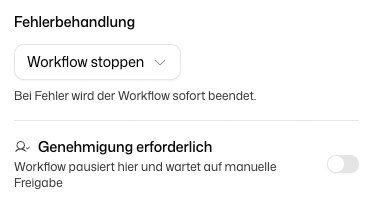
With Add approval message you can write an Approval message for the reviewer. It supports Markdown and variables from the trigger and earlier nodes, so you can show for example who submitted a form.
How an Approval Plays Out
- The run reaches the node and pauses before executing it.
- The request appears on Approvals in the Workflows sidebar and as a banner in the workflow's builder.
- A person reviews it and clicks Approve or Reject.
- Approve executes the node and the run continues. Reject stops the workflow.
If a subworkflow pauses for an approval, the workflow that called it waits as well.
Reviewing a Request
The page Pending Approvals lists every open request in the workflows you can access. Each card shows the workflow, the node, how long it has been waiting ("Waiting for …"), and the buttons Show details, Approve and Reject.
Show details opens the detail view:
- Message from workflow designer: the approval message, if one was set
- Inputs (will be executed): the values the node will run with, shown Formatted or in the Full view
- Open in Workflow Builder: shows the complete workflow context with the outputs of all earlier nodes
A decision cannot be taken back. Check the inputs before you approve, because the node runs with exactly these values.
The page only shows requests that are still open. Decided requests disappear from it; the outcome is visible in the workflow's execution history. If a request is no longer valid, for example because the run was cancelled, it is removed when you try to decide on it.