Open the Platform API
Sign in and open the Platform API. Your workspace already exists: it is created automatically on your first visit and holds your credits, payment methods and API keys. In an organisation, all members share the organisation's workspace.
The overview shows a Getting started checklist with the next steps.
Add credits
On a prepaid workspace, requests only run while there is credit. Open Billing, click Purchase Credits and pick a package or a custom amount. You need a credit or debit card as the default payment method. Prices are shown excluding VAT, and before paying you confirm the terms and waive your right of withdrawal.
You can also switch on Auto Top-up there, so the balance refills itself. Details: Billing.
If your organisation is billed by invoice, skip this step.
Create an API key
Open API Keys, click Add API key and give it a descriptive name, for example production or dev-testing.
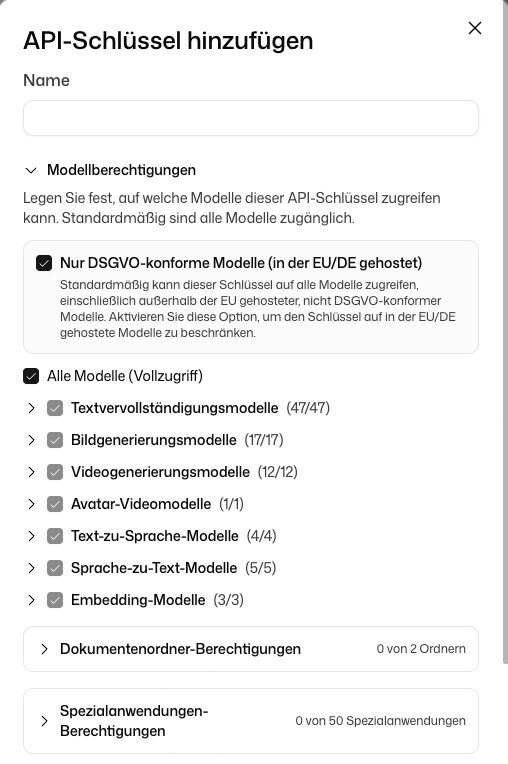
Check the defaults before you click Create API key:
- The key can use all models, but Only GDPR-compliant models (EU/DE-hosted) is switched on.
- The key has access to no document folders and no Custom GPTs. Select the ones it needs.
- There is no spending limit unless you enable one.
The full key appears once, under Save your key. Copy it and store it safely. It can't be shown again; if you lose it, create a new key and delete the old one.
Make your first request
Use the API key as a Bearer token in the Authorization header. The base URL depends on your deployment. On the hosted service it is https://api.deutschlandgpt.de/v2, a self-hosted instance uses https://<your-domain>/platform-api/api/v2.
A successful response looks like:
{
  "id": "chatcmpl-abc123",
  "object": "chat.completion",
  "created": 1712000000,
  "model": "claude-sonnet-4.6",
  "choices": [
    {
      "index": 0,
      "message": {
        "role": "assistant",
        "content": "Hello! How can I help you today?"
      },
      "finish_reason": "stop"
    }
  ],
  "usage": {
    "prompt_tokens": 9,
    "completion_tokens": 9,
    "total_tokens": 18
  }
}
Error: 402 Payment Required
A 402 means the request could not be paid for. On a prepaid workspace the balance is used up or the workspace's monthly limit is reached. Add credit under Billing or raise the limit under Budgets & limits. Other reasons are listed in Streaming, tools and structured output.
Next steps
- Chat Completions: full parameter reference, streaming, function calling.
- Models: see which models your key can use.
- Billing: credits, auto top-up, spending limits.