Billing
Purchase credits, set up auto top-up, add payment methods, and track your API spending.
Platform API requests are paid from your workspace. Most workspaces are prepaid: you buy credits up front and each request deducts its cost. Some organizations are instead billed by invoice, see Billing by invoice.
Everything here lives in the Platform API under Billing and Budgets & limits. Changing it needs the role permission Manage credits and spending limits.
The same balance also pays for pay-as-you-go chat and for Workflows.
Credits
Purchasing credits
On the Credits tab of Billing, click Purchase Credits and choose a package or a Custom Amount between €5 and €1,000. You need a credit or debit card as the default payment method; other payment methods can't be charged for credit purchases.
| Package | Credits |
|---|---|
| €10 | 10 EUR credit |
| €25 | 25 EUR credit (Popular) |
| €50 | 50 EUR credit |
| €100 | 100 EUR credit |
| Custom | €5 to €1,000 |
All prices are shown excluding VAT, which is added at checkout.
Before paying, you confirm the terms and waive your right of withdrawal, because the credit is delivered immediately. Credits are non-refundable once purchased.
Credit balance
The Credits tab shows Total Available Credits, the Estimated Range in days at your current pace, and your spend over the Last 7 Days and Last 30 Days with the Daily Average.
Purchased credits expire 3 years after the purchase date and are consumed oldest first. The Credit History lists every purchase with its remaining amount and expiry date. Download invoice on a purchase gives you its invoice.
How credits are deducted
Each successful request deducts credits according to what it used:
- Text completion: per input token and per output token, with separate rates for cached input.
- Embeddings: per input token.
- Images: per image, depending on quality and size.
- Video, avatar video, speech, transcription and music: in the unit the model is priced in, for example per minute of generated music.
- Web search: a flat rate per request.
The rates depend on the model. You find them on Models & pricing in the Platform API and publicly on Models & pricing.
What a request cost, in the response
Every text-completion response reports its own price. /v2/chat/completions and
/v2/responses both return it on usage:
"usage": {
  "prompt_tokens": 291339,
  "completion_tokens": 5,
  "total_tokens": 291344,
  "prompt_tokens_details": { "cached_tokens": 0, "cache_write_tokens": 291336 },
  "pricing": {
    "tier": "long_context",
    "currency": "EUR",
    "long_context_threshold_input_tokens": 272000,
    "input_per_1m": 0.44,
    "output_per_1m": 2.0,
    "cache_read_per_1m": 0.05,
    "cache_write_per_1m": 0.56
  },
  "cost": 0.16315948
}
cost is what was deducted from your credit balance, in EUR. pricing is the set of rates
that produced it: your rates, after your organization's price multiplier, not catalogue
figures. Both come from the same ledger write that charged you, so they cannot disagree with
your invoice.
On a streamed request the block rides on the usage chunk, so you need
stream_options: { "include_usage": true } to receive it.
Two fields are omitted when they do not apply: cache_write_1h_per_1m on a model that does
not charge for cache writes, and long_context_threshold_input_tokens on a model that bills
one flat rate at every context size. The whole block is absent for a model you brought your
own key for, because we charged you nothing for it.
Long-context pricing
Some models charge more once a single request's input crosses a threshold, typically 272,000 tokens for OpenAI models and 200,000 for Google ones. Above it the entire request is re-priced: input, cache reads, cache writes and output all bill at the long-context rates, which are usually double the short ones.
The threshold applies per request, not per conversation. Twenty requests of 15,000 tokens each are all billed at the short rates; one request of 300,000 tokens is not.
usage.pricing.tier tells you which of the two you paid, on every request. The thresholds
and rates for each model are on Models & pricing and on
Dashboard → Models; a dash there means the model has no
long-context tier.
Prompt caching
`ttl: "1h"` is NOT supported on `/v2/chat/completions` or `/v2/responses`
On the two OpenAI-shaped endpoints the one-hour cache point is not available. Every cache they write lives for five minutes, Anthropic's default.
"ttl": "1h" is still accepted rather than rejected, so an existing integration keeps
working and you do not need to strip the field out, but it is not applied. The
breakpoint is placed with the five-minute lifetime, billed at the five-minute cache-write
rate (1.25× input, not 2×, so nothing is over-charged), and the response says so with a
marker_ttl_unsupported warning in prompt_cache. Your cache simply expires sooner than
you asked for.
One follow-on effect: the ordering rule Anthropic's own API applies to mixed 1h/5m
requests does not apply on these two, because every breakpoint already has the same
lifetime, so a request Anthropic would reject with 400 is accepted here.
/anthropic/v1/messages is the exception, and is unchanged. There cache_control is
Anthropic's own field rather than an extension of ours, so ttl: "1h" is honoured, mixing
it with 5m works, the 1h-before-5m ordering rule is enforced, and a one-hour
write bills at 2× input.
For Anthropic models you can mark a stable prefix of your request with cache_control so it
is cached upstream and re-used by later requests. Send the marker on the last element you
want inside the cached prefix: a system message, a text content part, or a tool
definition:
{
  "model": "claude-sonnet-5",
  "messages": [
    {
      "role": "system",
      "content": [
        {
          "type": "text",
          "text": "<long, unchanging instructions>",
          "cache_control": { "type": "ephemeral" }
        }
      ]
    },
    { "role": "user", "content": "What changed today?" }
  ]
}
You place every breakpoint yourself. We never add one on your behalf, so a request with no
cache_control is not cached at all. A cache write costs more than an uncached read, and
only your access pattern says whether it will pay for itself.
A cache write costs 1.25× the input rate at 5m and 2× at 1h, and only
/anthropic/v1/messages can reach 1h (see above).
At most four breakpoints per request. If you send more, the latest four are kept (those are the ones that make your next request cheap), and the response tells you (see What we do with your markers). The field is ignored by non-Anthropic models, so it is safe to leave in place while switching models.
Where a breakpoint lands
A breakpoint caches everything up to and including the element you marked, so where you put it decides what gets re-used:
- On a content part, the boundary is at that part. This is the usual shape (a long stable document as the first part, your varying question as the second, marker on the first), and it is honoured exactly: the document is cached and the question is not.
- On a message, the boundary is at the end of that message.
- On a tool definition, the tool block is cached. The breakpoint is placed on your
systemmessage, because Anthropic orderstools → system → messages, so a prefix ending there covers the tool block in front of it. This needs asystemmessage in the same request; without one the marker is dropped and reported, because the only other place to put it is your first user turn, which changes every request.
The one place a boundary cannot be exact is a system message with several blocks: it is
sent as a single block, so a marker on anything but the last one widens to cover the whole
system prompt. If text after your marker varies between requests, the cache will not be read.
Put that text in a user message instead. The response says so when this happens.
What we do with your markers
If we cannot honour a marker exactly as written, the response says so in prompt_cache
rather than leaving you to infer it from your bill:
{
  "prompt_cache": {
    "cache_write_tokens": { "5m": 11219, "1h": 0 },
    "warnings": [
      {
        "code": "marker_dropped_no_anchor",
        "message": "1 cache_control breakpoint(s) on tool definitions could not be placed…"
      }
    ]
  }
}
cache_write_tokens is the per-TTL split the upstream host reported: the two numbers that
explain a cache-write charge. The field is omitted entirely when there is nothing to report,
so a request without cache_control is unchanged.
code | what happened |
|---|---|
markers_ignored_model | This model takes no request-side breakpoints: nothing cached, nothing charged. |
breakpoint_limit_exceeded | More than four breakpoints; the earliest were dropped. |
marker_dropped_uncacheable | The marked block cannot be cached after (a reasoning block, empty text, a non-image document). Sending it would have failed the whole request upstream. |
marker_dropped_no_anchor | A tool-definition marker was dropped because the request has no system message to carry it. Add one to cache the tool block. |
marker_ttl_unsupported | You asked for ttl: "1h" on /v2/chat/completions or /v2/responses, which do not support it. The breakpoint was placed with the five-minute lifetime and billed at the five-minute write rate. |
marker_ttl_upgraded | A tool marker and your first message asked for different TTLs, so they merged at the longer one, which bills that block at 2× input. Only reachable on /anthropic/v1/messages; give both the same ttl. |
marker_boundary_widened | A marker on a non-final system block widened to the whole system prompt (see above). |
marker_dropped_structured_output | A tool-definition marker was dropped because this response was generated without tools, so there was no tool block to cache. |
On /anthropic/v1/messages the per-TTL split is returned in Anthropic's own field instead
(usage.cache_creation.ephemeral_5m_input_tokens and …_1h_input_tokens), and prompt_cache
carries only the warnings, since Anthropic's own API has no field for them.
Marking a tool definition caches the tool block, and the system prompt with it, since Anthropic orders tools first. It requires a system message in the same request: with none, the marker is dropped rather than moved onto your first user turn, which changes on every request and would never produce a hit.
The response reports what happened, inside usage.prompt_tokens_details on
/v2/chat/completions and usage.input_tokens_details on /v2/responses:
| Field | Meaning | Price |
|---|---|---|
cached_tokens | served from the cache | the model's cache-read rate, by default 10% of the input rate |
cache_write_tokens | written to the cache | the model's cache-write rate, by default 125% of input (200% for ttl: "1h") |
Both rates differ per model and some models charge nothing to write, so read the exact figures
off Models & pricing, or off usage.pricing in your own
response, which reports the rates that request was billed at.
prompt_tokens / input_tokens is the inclusive total: both fields above are subsets of
it, not additions to it. Caching only saves money when the prefix is re-sent. A write costs
more than an uncached read, so mark a prefix you will send again, not a one-off request.
Mistral models: prompt_cache_key
Mistral caches prefixes automatically. There are no breakpoints to place, and
cache_control does nothing on a Mistral model. What a Mistral request needs instead is
prompt_cache_key, a stable, opaque string naming the cache lane the request belongs to:
{
  "model": "mistral-small-4",
  "prompt_cache_key": "conversation-42",
  "messages": [{ "role": "user", "content": "What changed today?" }]
}
Send the same value for every request that shares a prefix: one conversation, one
session, one workflow run. Requests carrying the same key are routed to the same cache node,
which is what lets the second request find the first one's prefix. It is accepted on
/v2/chat/completions and /v2/responses, and /v2/responses echoes it back.
Three consequences worth knowing before you wire it up:
- There is nothing to opt into and nothing to spend. Unlike an Anthropic breakpoint, Mistral charges no cache-write premium: a cached read is 10% of the input rate and a miss is simply the normal input rate. A lane that never gets re-read costs exactly what the request would have cost anyway. That is why we always set a key (yours when you send one, your workspace when you do not) instead of asking you to opt in.
- A hit is a likelihood, not a guarantee. Mistral's own documentation says the key
raises the chance of a hit rather than promising one, and measurement agrees: on one
repeated prefix we saw close to 100% on some Mistral models and well under half on others,
with no gap between requests short enough to fix it. Treat the saving as a discount you
often get, not a rate you can budget against. Mistral also caches in 64-token blocks, so
cached_tokensis always a multiple of 64 and a short prefix may not be cacheable at all. - Your value is namespaced to your workspace. We hash it together with your workspace id
before it leaves us, so two tenants who both send
"default"never share a lane and your key cannot aim at anyone else's cache. It is a routing hint, not an isolation boundary. Do not put secrets or personal data in it.
/anthropic/v1/messages takes no prompt_cache_key, because Anthropic's wire format does
not define one. A Mistral model served through that endpoint uses your workspace as its lane.
Auto top-up
Auto Top-up adds credits to your workspace when the balance falls below a threshold, so your integrations keep running.
Setting up auto top-up
Add a payment method
Open the Payment Methods tab of Billing and click Manage Payment Methods. In the billing portal of our payment provider, add a credit or debit card and make it the default.
Enable auto top-up
On the Credits tab, switch Auto Top-up on and set:
| Setting | Description | Default |
|---|---|---|
| Threshold (€) | Balance that triggers a top-up | €5 |
| Top-up Amount (€, excl. VAT) | How much is added each time | €5 |
Confirm the terms and the waiver of your right of withdrawal for future top-ups. From then on, your card is charged automatically whenever the balance drops below the threshold.
After three failed top-up charges in a row, auto top-up is switched off and you get an email. Fix the payment method and enable auto top-up again.
Payment methods
On the Payment Methods tab, Manage Payment Methods opens the billing portal of our payment provider. There you add or remove cards and choose the default, which is used for purchases and auto top-up.
Card details are stored by the payment provider, Stripe. DeutschlandGPT never stores them.
Complete setup
The Credits tab shows Complete setup with three steps: Add a payment method, Add credits and Enable auto top-up. Each step has its own button, and the box disappears once all three are done.
Monthly spending limit
To cap the workspace's total spend for a calendar month, open Budgets & limits and set the Monthly Limit (€). Leave the field empty for no limit.
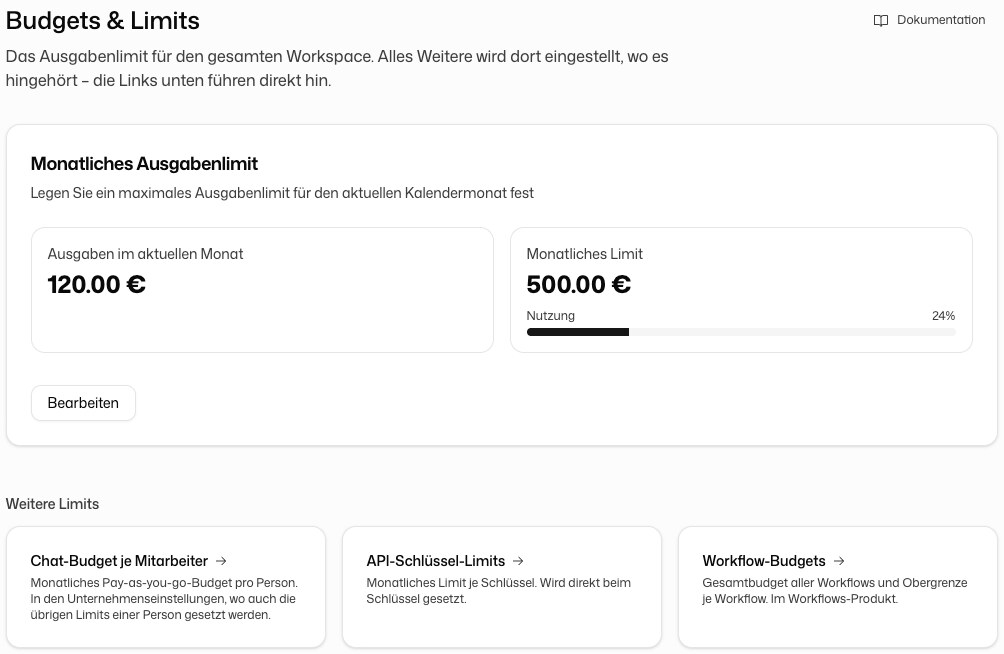
Once the limit is reached, requests return 402 Payment Required until the next month starts or you raise the limit.
The same page links to the other limits under Other limits: the Chat budget per member, the API key limits set on each key, and the Workflow budgets.
Billing by invoice
Some organizations are billed by invoice instead of from a prepaid balance. Their billing page says Billed by invoice and there is nothing to top up. Usage is invoiced monthly, quarterly or yearly, depending on the agreement. The invoices for this usage are listed on the Invoices tab of Billing, visible to everyone with the permission Manage billing and licences; licence invoices are under Organization settings → Billing & usage → Billing.
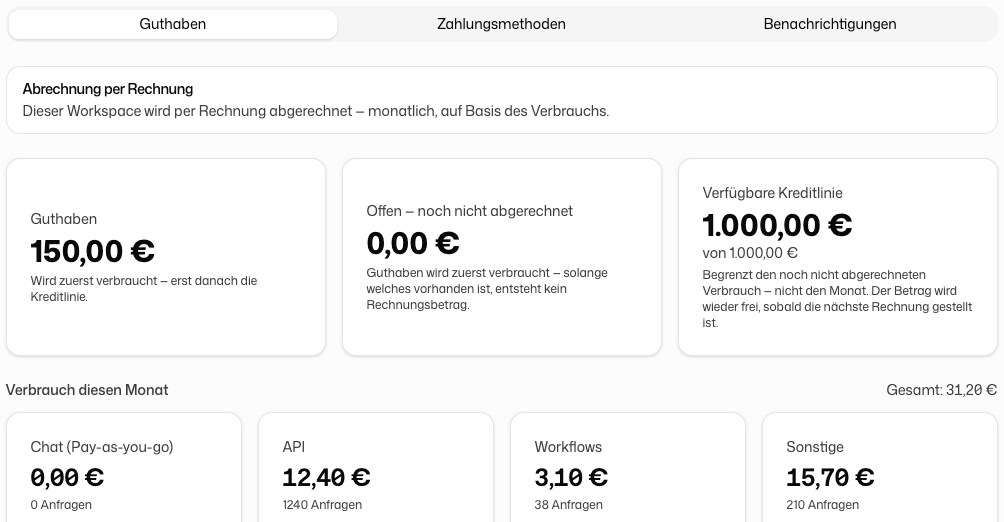
- Open, not yet invoiced shows what will appear on the next invoice.
- A credit line caps the usage that has not been invoiced yet. It is released again once the next invoice is issued. Without a credit line nothing can be billed.
- If the workspace also has credits, they are spent first.
The billing mode and the credit line are agreed with DeutschlandGPT. Contact Support to change them.
Usage overview
The Credits tab shows your balance and recent spend. Usage breaks spending down by API key, model and time range and exports it as a spreadsheet. See Dashboard.
Notifications
On the Notifications tab of Billing, the master switch Send notification emails turns all billing emails on or off. Below it you choose the individual notifications:
| Notification | Sent when |
|---|---|
| Low credit balance | Available credits fall below the threshold (default €1.00) |
| Credits depleted | Available credits reach €0 |
| Auto top-up threshold reached | The balance is below the auto top-up threshold but auto top-up is off |
| Monthly limit warning | Monthly spend reaches the warning threshold (default 80%) |
| Monthly limit reached (100%) | Monthly spend reaches the full limit |
| Credit line warning | Open, not-yet-invoiced usage reaches the warning threshold of your credit line (default 80%; invoiced organizations only) |
| Credit line exhausted (100%) | Open usage reaches the full credit line; requests are declined until it is invoiced or the line is raised (invoiced organizations only) |
Each notification is sent at most once every 24 hours.
Invoices
Every credit purchase has an invoice. Download it with Download invoice in the Credit History, or find all invoices in the billing portal behind Manage Payment Methods. Invoices are kept for 10 years, as German tax law (§147 AO) requires.