AI Models
Control which AI models your organization can use, set the fallback and default models, and add custom models
Choose the AI models your organization may use, and which model is used when no other applies, under Organization settings → AI & models → AI Models. The models sit in the tabs Language Models, Image Generation Models and Embedding Models. For language models that is a fallback model, for images a default model.
New models
The switch sits at the top of the AI models page, in the section New models.
Enable new models automatically controls what happens to an AI model DeutschlandGPT adds in future. It applies to language, image, text-to-speech, transcription and avatar video models.
- On (default): a new model follows the usual rule, so an EU-hosted model is available to your organisation right away. If you do not want it, switch it off afterwards in the list below.
- Off: a new model starts disabled and only appears in the model picker once an administrator switches it on in the list below. This also applies to the next generation of a model you switched on.
Switching this off is not retroactive. Every model available to your organisation at that moment stays switched on. Your organisation's own custom models are exempt and always available. Only people who may also manage the organisation's AI models see this switch.
Language models
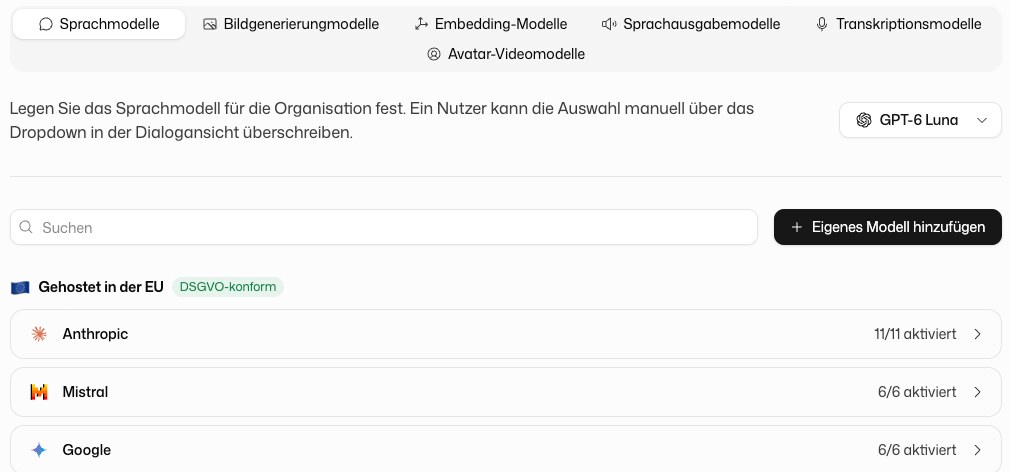
Set the fallback model
Members always start on Auto: DeutschlandGPT picks a suitable model per conversation. Anyone who wants a specific model and has the permission Choose the AI model picks it in the chat or in their own model preferences. Disabled models never appear in the model picker.
The dropdown at the top sets the organization's fallback model. It is used when a pinned model is no longer available, for example because you disabled it or because a GPT uses a model that no longer exists. If the dropdown is set to Auto, there is no fixed fallback model and Auto picks in those cases too. Premium models can be switched on for members but cannot be the organization's fallback model; the settings page explains why. If you choose a model marked as outdated, a warning first says that it is no longer recommended and offers its successor when there is one; you can still keep it.
Enable and disable models
Every model has a switch, and the counter, for example "8/20 activated", shows how many are on. Disabling a model removes it from the model picker for all members immediately. The fallback model cannot be disabled; choose a different fallback model first. Hover over a model's price to see the cost of input and output per one million tokens. The switch above the list chooses which price is shown: Chat (the default) is the cost basis we use to calculate the usage included in your subscription; Pay as you go is the price you pay once you have used up your included usage and continue on pay-as-you-go.
The list is grouped by where the models are hosted:
| Group | Badge | Meaning |
|---|---|---|
| Hosted in EU | GDPR compliant | Data is processed within the EU |
| Hosted internationally | Not GDPR compliant | Data may be processed outside the EU. Check the provider's terms before enabling |
| Custom Models | Models your organization added itself |
Models DeutschlandGPT recommends for most tasks carry the badge Recommended. If your organization uses professional secrecy (§203), models without a covered provider are shown but cannot be enabled.
To enable or disable a model only for certain groups or members, open that group or member under Groups or Members and set the model's availability there.
New models: a model DeutschlandGPT adds starts switched on if it is hosted in the EU and off otherwise. If it is the next generation of a model your organization switched on or off itself, it takes over that decision: if you switched the predecessor off, the successor starts off; if you switched it on, the successor starts on, provided your organization may use it (for example under §203). Settings for groups and users are carried over the same way. You can switch any model afterwards as usual.
If you switched off Enable new models automatically in the New models section above, every new model starts disabled, including an EU-hosted one and the next generation of a model you switched on. It only appears in the model picker once you switch it on here.
If a Custom AI Application uses a specific model and that model is disabled, the application falls back to the organization's default language model.
Add a custom model
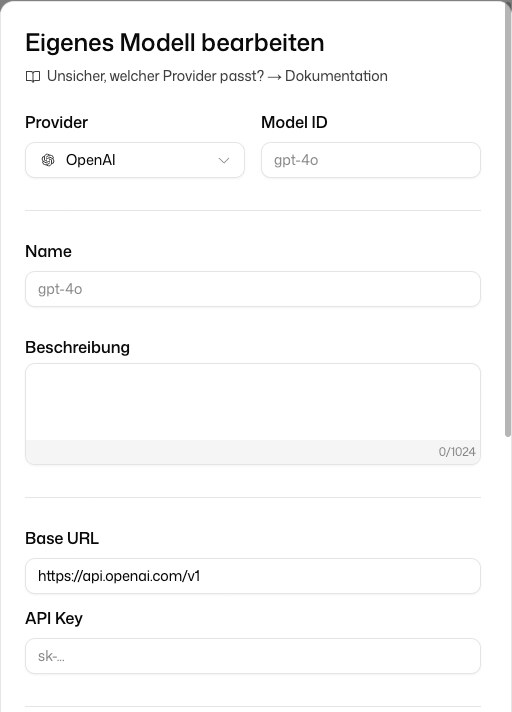
Click Add Custom Model to connect a model through your own provider account. Choose the Provider, enter the Model ID and the credentials the provider needs, and switch on what the model supports: Supports Tool Calls, Vision (Image Analysis) and Supports Reasoning. Under Cost you can enter prices per one million tokens for internal cost attribution.
Custom models appear under Custom Models and can be edited or deleted there. The organization’s fallback model can only be deleted once you have chosen a different one. Anyone who had pinned a deleted model uses the fallback model afterwards. Which provider fits and how to fill in the fields is explained under Custom models.
Image generation models
Here you set a real default model and switch individual models on or off. The default model is used in Custom AI Applications and wherever images are generated without an explicit model choice. Members see it in their model preferences as Your organization's default and can pick a different model there.
Enable a model in the group Hosted internationally only after checking your organization's data-processing requirements.
Embedding models
Embedding models index uploaded files so document folders and integrations can be searched by meaning. One embedding model is active at a time.
Embeddings from different models do not fit together, so changing the embedding model re-indexes every document. Organizations rarely need to change this setting.