Pay-as-you-go
Let members keep working after their usage limit and control what that may cost
Pay-as-you-go lets members keep working after they reach the usage budget included in their licence. The extra usage is billed per token at the prices listed for each model under Organization settings → AI & models → AI Models in the Pay as you go view. You manage it on the Plan tab under Organization settings → Billing & usage → Billing with the permission Manage billing and licences.
Set it up
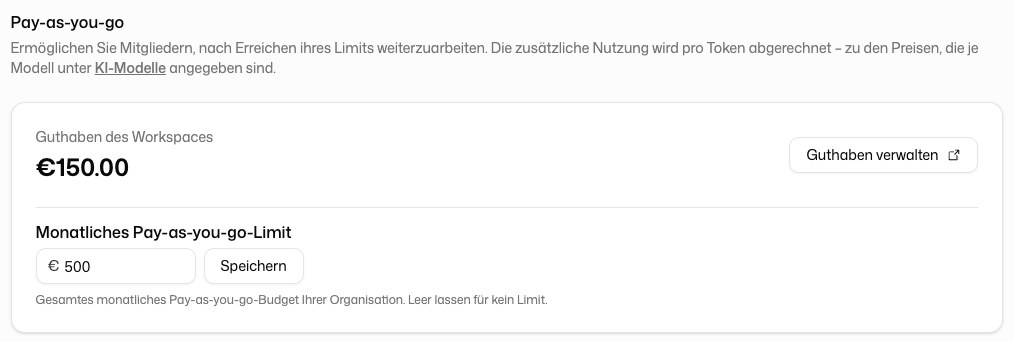
Pay-as-you-go bills usage against a Platform API workspace with a credit balance.
- If there is no workspace yet, the tab shows No platform-API workspace yet. Click Create workspace.
- If the workspace has no payment method, the tab shows Workspace not funded. Click Set up billing.
- Top up credit with Manage credits. The card Workspace balance shows what is left.
Limit the cost for the organization
Monthly pay-as-you-go limit caps the total pay-as-you-go spending of your organization per month. Leave it empty for no limit.
Enable pay-as-you-go per member
Who may use pay-as-you-go, and up to which amount, you decide per member in the Pay-as-you-go column on the Members page: switch on Enable pay-as-you-go and set a Monthly limit (EUR) if you like. Without pay-as-you-go, a member who reaches their limit only has the budget models left. Members see the offer on their own Usage page. A shared budget for all members exists only for pay-as-you-go: the Monthly pay-as-you-go limit above. The budget included in the licence always applies per member.
A limit can be exceeded slightly, because the cost of a single request is not known in advance. Once the limit is reached, further requests are blocked or move to budget models.
Organizations without an included budget
Some organizations use pay-as-you-go for all members, with no budget included in the licence price. Their tab shows Total spend this month instead of a balance; the amount is billed through the regular invoice. Under Default limit per member you set the monthly limit for every member without an individual limit. Leave it empty to use the platform default.
Only these organizations also see Keep working after the limit. It decides what happens when a member reaches their personal pay-as-you-go limit:
- On: the member continues with cheaper budget models instead of being blocked. That usage is still billed, so the invoice can exceed the sum of the limits.
- Off: the limit is a hard stop. The member can continue next month or once their limit is raised.
When the credit balance is empty
Pay-as-you-go spends your organization's Platform API credit balance. Once it is used up, enabled members drop back to the budget models, even though pay-as-you-go stays switched on and their own limit still has room. You don't need to set anything up again. Top up the balance on the Credits tab at /platform-api/organization/billing. The member's usage page and the member table both say so explicitly.
Two limits that are easy to confuse
- Monthly limit per member: what a single person may spend. You change it per row in the member table. On a licence plan, an empty field means only a high safety ceiling applies, not a budget. To limit what a member may spend through pay-as-you-go, enter an amount.
- Organization monthly limit: the ceiling for everyone together, on the Plan tab of the billing page.
For each member with pay-as-you-go switched on, the member table under Organization settings → Members & access → Members shows how much of that member's limit is spent this month and how much is left, with a bar. A member without an amount is measured against the safety ceiling. With any date range other than the current calendar month, the table shows only the spend in that range: the limit is monthly and resets, so nothing is "left" outside the current month.
A member who sees a smaller number than the one you set is usually looking at their own limit, not the organization's. The pay-as-you-go bar on the usage page shows consumption, not remaining credit: it counts up towards the limit as money is spent. How much credit the organization has left is shown only on the billing page.