Integrations
Connect external services so DeutschlandGPT can search and act on their content
Integrations connect DeutschlandGPT to the tools you already use, so it can find answers in your data and take actions on your behalf. Where you set one up depends on what you want it to do.
Connect a service to your account and the AI searches it while answering: Confluence, Jira, Outlook, Teams, Notion, Google Drive, and more.
Add actions and triggers from external services: send a Slack message, create a Jira issue, or start a workflow when an email arrives.
Administrators set which integrations members can use and what they may do, with group and user overrides on top of the org-wide default.
Connect any MCP-compatible server by URL so its tools are available in chat, Code and Cowork.
Guides for individual services
Workflows → Integrations lists every supported service. The most-used ones have a page of their own, covering how to connect them, what each permission is used for, what you can do with them, and how to remove them again. Frequently opened: Zoom, Slack, Microsoft Teams, Google Drive. For the rest, the connect flow is the same and the available actions are listed in the node picker inside the workflow editor.
What stays private
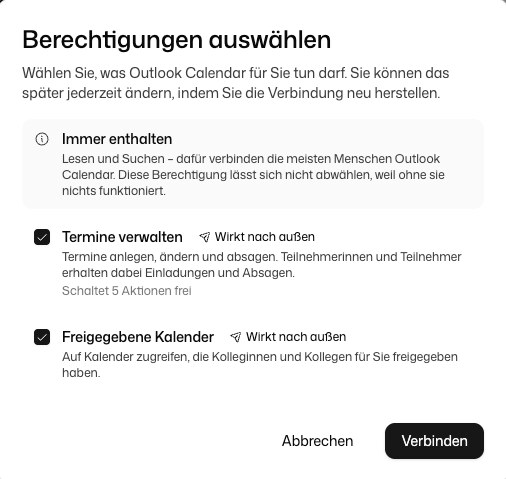
When you connect a chat integration, reading and searching are always included. Anything that changes data in the service, such as sending an email, managing calendar events or editing a Jira issue, is a separate permission. You can choose these permissions yourself when connecting, and your organisation can switch individual ones off for everyone. In the chat, the AI only acts in a connected service in agent mode, and it asks for your approval first unless you have allowed that kind of action to run without asking. See Tools.
Workflow connections act on your behalf with the credentials and permissions you grant. In all cases credentials are stored encrypted, and you can delete a connection at any time to revoke access immediately.
Each connection belongs to you. Others can only use it if you share its credentials with them, and sharing a workflow does not do that. Details: Choose permissions when connecting.