Models and Limits
How the model picker and Auto mode work, and how to spend your usage budget well
DeutschlandGPT brings models from several vendors together in one place, and you choose per conversation which one answers. Models hosted in Germany or the EU are available by default. Models hosted elsewhere only appear if your organization has switched them on.
Choose a Model
The model picker sits in the header at the top of the chat. A switch takes effect from the next message, and the conversation continues as before. If you would rather not decide, leave Auto selected.
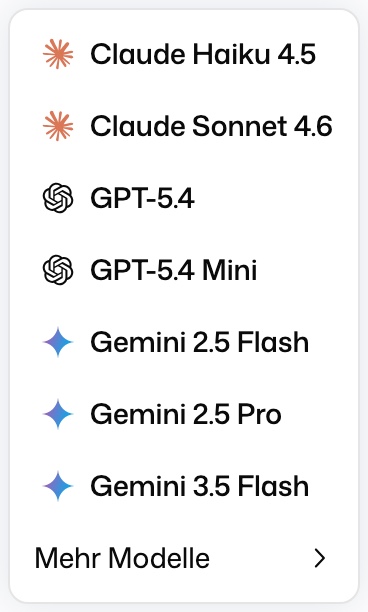
The picker is built like this:
- Auto at the top lets DeutschlandGPT choose (see below).
- Below it are recommended models as quick picks, each with a badge such as Recommended for a use case.
- Every provider has its own submenu with all of its models that you may use.
- Models your organization added itself are grouped under Custom models.
- A flame marks an Expensive model: it uses up your monthly limit much faster.
Which models exist changes over time, so this page doesn't list them. The picker always shows what you can use right now. For a side-by-side comparison of what each model can do, open Model capabilities overview. Your default model for new chats is set under Model preferences.
Models whose weights are openly published are listed together under Open Source in the model picker, each with its developer's logo, instead of under their developer. An open model from OpenAI or Google is therefore found there, not in the OpenAI or Google group.
Models differ in what they can do: not every model understands images, can use tools or handles very long inputs.
Auto Mode
With Auto, DeutschlandGPT looks at the first message of a conversation, decides what kind of task it is (everyday work, research, or reviewing and checking) and picks a suitable model. The conversation keeps that model for all later messages. If you always want a specific model, pick it by name.
In the main chat on the web, every answer names the model that wrote it, in small grey text next to the buttons under the answer (copy, regenerate and so on). Like those buttons, it appears when you move the mouse over an answer, and under the newest answer it is always shown. For an answer written in Auto, hovering the name shows that the model was chosen automatically and how hard it was asked to think. Older answers show the model that was requested for them; if that model was unavailable at the time, a different one may have answered. In the desktop app, only answers written in Auto carry the name.
The same picker, with Auto on top, appears in the Workflows sidebar and in the Office add-ins for Word, Excel, PowerPoint and Outlook. Choosing Auto in any of them is one setting for your whole account: new chats in the main chat start on Auto as well, while an existing chat keeps its own choice. Choosing a specific model in a sidebar or an add-in applies only there (in an add-in: on that device) and leaves the main chat unchanged.
If your monthly limit is reached and your organization lets you keep working on budget models, Auto stays in the picker and answers with one of those models.
The model a new chat opens with is set in your preferences.
Each Chat Remembers Its Model
When you reopen a chat in the main chat, it uses the model (or Auto) it was last used with, even if you picked a different model in another chat since. The picker shows your choice, for example Auto; which model wrote an answer is shown under that answer. Picking a different model inside a chat switches only that chat. If the remembered model is no longer available to you, the chat uses your default model instead, and the picker shows that. While your monthly limit is reached, a chat on a model picked by name shows the cheaper model that actually answers, and a chat on Auto keeps showing Auto.
Premium Models
Premium models are marked with a flame in the picker. You can choose one for a chat, but it is never saved as a default: once you send a message with it, that chat keeps it, also after a reload or on another device, while every new chat opens on your saved default. Premium models are not offered as the default in your preferences or as your organization's fallback model. Which models count as premium changes over time, so look for the flame in the picker.
Outdated Models
DeutschlandGPT can mark a model as outdated while it is still offered. When you pick it, a warning tells you to expect worse results and, when a newer model is available to you, offers that one with both models' usage rate and a button to switch. You can always keep the outdated model. The same warning appears when you choose it as your default model in your preferences. While a chat runs on it, a notice above the input says the same, with Switch to … when a successor is available. You can turn the warning and the notice off under Outdated-model warnings in your preferences.
Thinking Effort
Some models can think before they answer. When you pick one of them by name, the model picker shows a Reasoning effort row below the models, and the picker button shows the chosen level next to the model name:
- Instant: The model answers as fast as possible.
- Auto: The model decides how long to think.
- Thinking: The model thinks longer for better answers.
Longer thinking usually gives better answers to hard questions, but takes more time and uses more of your limit.
When a Model Is Switched Off
Before DeutschlandGPT switches a model off, it is deprecated for about a month. It keeps working wherever it is already in use, but the picker no longer offers it. If you still have it selected, the picker shows a notice with the switch-off date and the successor model, and you can switch right away. Everyone affected gets an e-mail, with a weekly reminder while they still use the model.
On the switch-off date, every place where the model is selected moves to the successor automatically: default models, Custom AI Applications, scheduled tasks, chatbot widgets, workflow nodes (the draft and every published version) and API key model allowlists. The one exception is a workflow that names the model inside code or free text, for example in a script or a prompt. That text is never rewritten, and the workflow's owner gets an e-mail naming the workflow to change by hand. API calls with the old model name then fail with a message that names the successor.
Understanding Limits
Usage is measured in tokens, the text units that make up input and output. Each model uses your limit at a different rate: powerful models draw on it faster, fast models considerably slower. The ring in the input field shows how much of your monthly budget you have used.
What happens once the monthly limit is reached depends on your plan and organization:
- DeutschlandGPT can switch you to lower-cost models until the start of next month. The picker then says Monthly limit reached, and Auto keeps working with those models.
- Alternatively, pay-as-you-go can be enabled so that usage beyond the limit is billed separately.
- On top of that, fair-use limits absorb short bursts of load.
Your current usage is under AI Usage.
Use Your Limit Wisely
You get the most out of your limit by matching model strength to the task:
| Task | Recommendation |
|---|---|
| When in doubt, or for mixed work | Let Auto choose |
| Demanding writing, analysis, coding, reasoning | A strong model, ideally one recommended for the task |
| Short questions, summaries, rewrites, routine work | A fast model without the flame marker |
Reach for a top-tier model only when a task truly needs it. For most day-to-day work a fast model is plenty and uses your limit far more slowly.
When an expensive model handles a task a smaller one would do just as well, a short note appears under the answer. You can switch these notes off with Model cost warnings under Model preferences.