Action Nodes
Built-in nodes for HTTP requests, web search, delays, code, images, data tables, secrets and flow control
Action and flow nodes do the work between trigger and result: fetch data, run code, wait, branch, loop and call other workflows. Each node has inputs, which you type in or fill with variables, and named outputs that later nodes can use.
Settings Every Node Shares
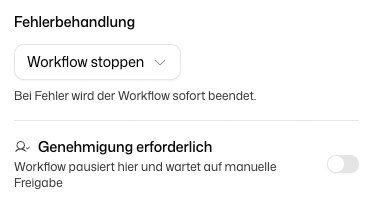
Action, integration and agent nodes have two settings at the bottom of their panel:
- Error handling: Stop workflow (default) ends the run when the node fails. Use error output activates the node's error output instead, so you can connect a fallback path.
- Approval required: the run pauses before this node until someone approves it. See Approvals.
Actions
HTTP Request
Sends an HTTP request and returns the response.
| Input | Required | Description |
|---|---|---|
| URL | Yes | The URL to call |
| Method | Yes | GET (default), POST, PUT, PATCH or DELETE |
| Headers | No | Key-value pairs sent as request headers |
| Request Body | No | Body for POST, PUT and PATCH |
| Response Type | No | Auto (text/JSON) (default) or File (binary) |
| File Name | No | Name of the downloaded file when the response type is File (binary) |
| Output | Type | Description |
|---|---|---|
response | any | The response body. null when the response type is File |
statusCode | number | HTTP status code |
file | WorkflowFile | The downloaded file, only for response type File |
- With
Auto (text/JSON), a binary response (a PDF, an image, a ZIP) fails the node with a message to switch the response type toFile (binary). A file is stored up to 100 MB. - Sending the token of a Get Auth Credentials node: see Get Auth Credentials.
Web Search
Searches the web.
| Input | Required | Description |
|---|---|---|
| Search Query | Yes | What to search for |
| Max Results | No | Number of results, 1 to 100 (default 10) |
| Output | Type | Description |
|---|---|---|
results | array | The search results |
resultCount | number | Number of results returned |
Delay
Pauses the run for a duration or until a point in time, then continues. Nothing keeps running while it waits.
| Input | Required | Description |
|---|---|---|
| Wait Mode | Yes | For a duration (default) or Until a specific time |
| Duration | Depends | How long to wait, for the duration mode |
| Unit | Depends | Seconds, Minutes (default), Hours or Days |
| Resume At | Depends | The point in time to continue, for the until mode |
| Output | Type | Description |
|---|---|---|
resumedAt | string | ISO timestamp at which the run continued |
If Resume At is already past, the run continues at once. A single Delay can wait at most 90 days. A longer wait fails the node.
RSS Feed
Fetches and parses an RSS or Atom feed.
| Input | Required | Description |
|---|---|---|
| Feed URL | Yes | The feed address |
| Max Items | No | Maximum number of items, 1 to 100 (default 10) |
| Output | Type | Description |
|---|---|---|
items | array | Feed items, each with title, link, description, content and pubDate |
feedTitle | string | The feed's title |
feedDescription | string | The feed's description |
itemCount | number | Number of items returned |
Code
Runs JavaScript. Use it for filtering, sorting, string handling, calculations and other logic that needs no AI.
| Input | Required | Description |
|---|---|---|
| Code | Yes | The JavaScript to run |
| Output | Type | Description |
|---|---|---|
result | any | The value your code returns |
-
Your code must
returna value. That value becomesresult. -
Outputs of earlier nodes are available as global variables under their variable name, for example
formTrigger.outputs.formData. Do not use the{{…}}syntax here. -
asyncandawaitwork, andfetchis available for HTTP calls. -
fetchAs('jira', '/rest/api/3/myself')calls a connected service with its credentials, exactly like the Authenticated Request node, and returns a response withstatus,ok,headers,text(),json()andbytes(). It uses a connection that another node of the same workflow already uses. If the workflow uses several connections of one service, name one:fetchAs('jira@<site or account of the connection>', …). The credentials never reach your code. A redirect to another host, as a download link answers with, is followed without the credentials;await res.bytes()then holds the file. Responses are limited to 10 MB. -
dg.log(),dg.debug(),dg.warn()anddg.error()write to the node's log in the execution history.console.log()works too. -
Besides standard JavaScript, these helpers are built in:
atob()andbtoa()for Base64 (Latin-1 text only, as in the browser), andBufferfor bytes and other encodings, for exampleBuffer.from(text, 'utf8').toString('base64')orBuffer.from(b64, 'base64').toString('utf8').TextEncoderandTextDecoder, including the optionsfatalandignoreBOM.JSZipto read and write ZIP files. Word, Excel and PowerPoint files are ZIP files too, so you can read the text of a downloaded document:const zip = await JSZip.loadAsync(await response.bytes()); const xml = await zip.file('word/document.xml').async('string');. Password-protected ZIP files cannot be opened.setTimeout()andclearTimeout(), for example to wait between two requests. A timer has to fire within 60 seconds of the start, and at most 1,000 timers can be pending at once.require('buffer')andrequire('jszip')return the same libraries.
-
The code runs in an isolated sandbox. There is no file system, no npm packages and no
import;require()knows only the two names above.FormDataandBlobare not available. -
Limits per run:
- 60 seconds of computing time, and 5 minutes in total including the time spent waiting for requests and timers.
- 512 MB of memory.
- A result of at most 10 MB.
- The first 1,000 log lines or 1 MB of log text are kept.
Over the time, memory or result limit, the run stops with an error that names the limit. Log lines beyond the limit are dropped with a notice.
const items = formTrigger.outputs.formData.items;
return items.filter((i) => i.status === 'open').map((i) => i.title);
Image Generation
Generates an image from a text prompt.
| Input | Required | Description |
|---|---|---|
| Model | Yes | The image model |
| Prompt | Yes | Description of the image |
| Output | Type | Description |
|---|---|---|
image | WorkflowFile | The generated image |
revisedPrompt | string | The prompt as the model interpreted it, if the model rewrites prompts |
Data Tables
The sub-view Integrations → Data Tables in the node picker holds four nodes: Data Table: Get Rows, Insert Row, Update Rows and Delete Rows. Their inputs and outputs, and the three further nodes of the Data Table integration, are documented on the Data Table integration page.
Secret Stores
The sub-view Integrations → Secret Stores reads values from your Secret Stores:
- Get All Secrets: input Secret Store, output
variables, an object of all keys and values - Get Single Secret: inputs Secret Store and Variable Key, output
value
Later nodes reference these outputs like any other variable, for example {{getAllSecrets.outputs.variables.API_KEY}}. Values marked as secret are passed on as references and only resolved when the next node runs, so the node outputs and the execution history show a reference instead of the value.
Flow
Condition
Routes the run into one of several branches. Each branch has a label and a condition. The first branch whose condition is true runs.
A condition is a JavaScript-like expression with variables:
{{webSearch.outputs.results.length}} > 0
{{httpRequest.outputs.statusCode}} === 200
{{aiAgent.outputs.result.sentiment}} !== "negative"
{{code.outputs.result.flag}} === true
Write the variable without quotes. Text values are compared as text, with the comparison value in quotes ("negative"); numbers and booleans without quotes (200, true). Text that is exactly a number, true, false or null is compared as that value, so "200" equals 200. A variable inside a regular expression (/…/) is not supported; to search text, use .includes("…").
Instead of an expression you can write the condition in plain language with the AI Prompt mode; an AI model then decides whether it holds. That costs tokens.
There is no automatic default branch. To catch everything else, add a last branch with the expression true.
| Output | Type | Description |
|---|---|---|
matchedConditionId | string | ID of the branch that matched, or null |
matchedConditionLabel | string | Label of the branch that matched, or null |
evaluationErrors | array | Branches whose condition could not be evaluated, each with conditionLabel and error. Such a branch counts as not true; a variable that does not exist stops the workflow with an error |
Loop
Adding a loop places a Loop Start and a Loop End node. The nodes between them run once per item.
Loop Start takes an Array and provides per iteration:
| Output | Type | Description |
|---|---|---|
currentItem | any | The current item |
currentIndex | number | Zero-based index of the item |
items | array | All items |
total | number | Number of items |
isFirst | boolean | Whether this is the first item |
isLast | boolean | Whether this is the last item |
Loop End takes an Iteration Result, the value to collect from each pass, and returns:
| Output | Type | Description |
|---|---|---|
results | array | The collected iteration results |
count | number | Number of iterations |
Subworkflow
Calls another workflow that starts with a Subworkflow Trigger and waits for it to finish. Choose the workflow and fill in the parameters its trigger defines.
The called workflow must be deployed, active and in the same workspace. Calls can be nested up to 10 levels deep. If the subworkflow pauses for an approval, the calling run pauses too.
The node's outputs contain the outputs of the subworkflow's nodes, grouped by node, for example {{subworkflow.outputs.<node>.<field>}}. The Variables panel shows the exact paths. Costs inside the subworkflow count toward the calling run.