Support
Need help with DeutschlandGPT? Send feedback, reach our team, follow up on your reports, and check service status.
Help is always one click away. The quickest way to get it is right inside the app, without leaving your chat.
Get Help from Inside the App
Look for the round question mark button in the bottom-right corner of the screen. It's on every page and is your central place for help. A coloured dot on it signals something new: an active incident or a new product update.
Send Feedback
Send feedback opens a single form for everything: bugs, support requests, and feature ideas. First pick the right type. There are five:
- Bug report: something isn't working as expected
- Feature request: a capability you're missing
- Support: you need help with something
- Improvement: something works but could be better
- Other: anything else
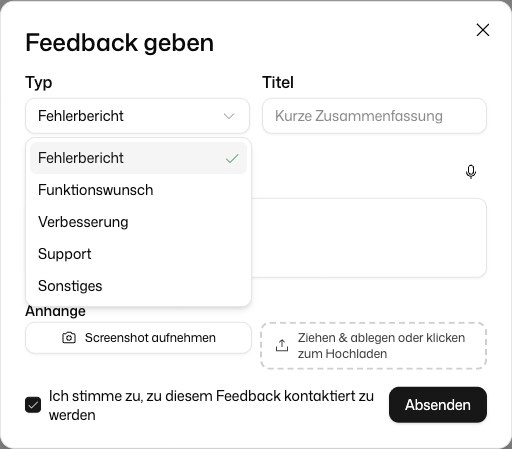
Then give your report a short Title and a Description, which you can also dictate. Under Attachments you can add up to 5 files of up to 100 MB each, or click Take Screenshot to attach the current screen. In Chrome and Edge on a computer, your browser first asks whether to share this tab: allow it for an exact picture of the page, or decline and the page is drawn from its content instead. The form lists the context that is sent along, such as the page you are on. Tick I agree to be contacted about this feedback if we may get back to you.
To report a single wrong answer in a chat, use the flag icon Report answer under that answer. It opens the same form with the conversation already attached.
Follow Up on Your Reports
Below the form, the dialog lists your three latest reports with their status. All of them are under Settings → My feedback, with the current status, for example Under review, In progress or Waiting for you, and the replies from our team. A report with New reply has an answer waiting. You can reply there, change the title and description as long as nobody has started working on the report, and delete a report.
Without Signing In: the Web Form
Not signed in, or just reading the documentation? The same form is reachable directly at beacon.deutschlandgpt.de/feedback. It has the same types and goes to the same inbox, no account needed.
Contact Support
Stuck, or is your issue urgent? Click the question mark button in the bottom-right, choose Send feedback and pick the type Support. Contact support in the account menu at the bottom of the sidebar opens the same form.
Question mark button, bottom-right → Send feedback → type Support
The Menu at a Glance
Clicking the question mark button opens a small panel:
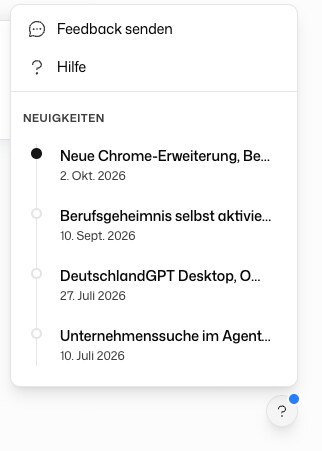
One form for everything: bugs, support, feature requests. Click here to open it directly.
Opens a new e-mail to our customer service in your mail program.
Only shown while a service is disrupted, with a link to the status page.
A timeline of the latest product updates and changelogs, so you always know what changed.
The account menu at the bottom of the sidebar also links to this Documentation.