Permissions
Control which models, folders and Custom GPTs an API key can reach, set its spending limit, and see which role permissions the Platform API needs.
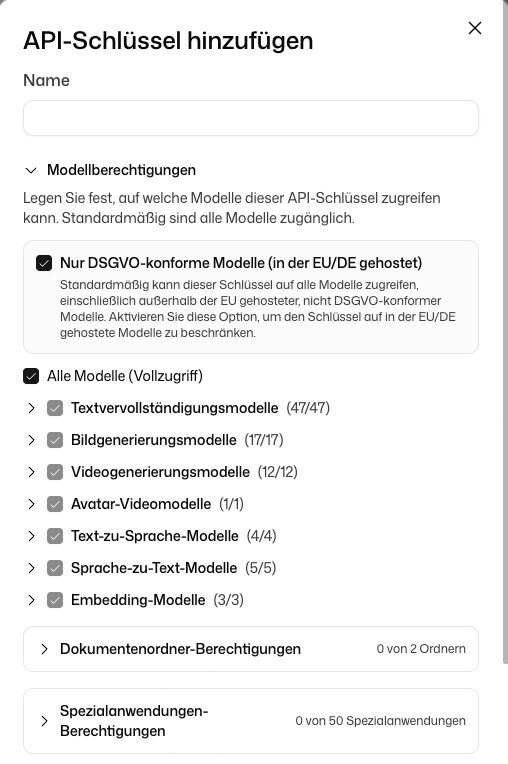
Every API key carries its own permissions. A new key starts narrow: it can use all models but only GDPR-compliant ones, and it has no access to document folders or Custom GPTs until you grant it. You set this when you click Add API key and change it later with Edit permissions.
Who may manage keys
In an organisation, two role permissions govern the Platform API:
| Role permission | Allows |
|---|---|
| Use the Platform API and manage API keys | Opening the Platform API and creating, changing and deleting API keys |
| Manage credits and spending limits | Buying credits, payment methods, auto top-up and spending limits |
Your administrator assigns them in the role settings.
Permission types
| Type | Controls | Default for a new key |
|---|---|---|
| Model Permissions | Which models the key may use for completions, embeddings, images and more | All models |
| Only GDPR-compliant models | Limits the key to models hosted in the EU or Germany | On |
| Document Folder Permissions | Which document folders the key may list, read and search | None |
| Custom GPT Permissions | Which Custom GPTs the key may list and use | None |
| Monthly Spending Limit | Maximum monthly spend of the key | Off |
| Admin Permissions | Access to usage export and audit log export | None |
If your organisation is subject to professional secrecy (§203 StGB), the key is always limited to GDPR-compliant models and to models covered by your §203 addendum. Both switches are on and can't be turned off.
Empty-list semantics in the API
When you read or set permissions through the API, an empty list means different things per resource:
- Models: an empty or missing
modelIdsmeans the key can use all models. Add at least one ID to restrict it to those. - Document folders and Custom GPTs: governed by a separate
restrictDocumentFolders/restrictCustomGptsflag, which is on by default. While it is on, an empty list means no access. Set it tofalseto grant access to all folders or Custom GPTs regardless of the list.
GET /v2/apiKeys returns every key you can see with its current permissions and spend.
Spending limits
In the dashboard you enter the limit in euros, as Limit (EUR). When a key reaches it, its requests return 402 until the next month or until you raise the limit. Other keys keep working.
The API reports amounts in microcents (1 EUR = 100,000,000 microcents):
| EUR amount | Microcents |
|---|---|
| 0.01 EUR | 1,000,000 |
| 1.00 EUR | 100,000,000 |
| 50.00 EUR | 5,000,000,000 |
The GET /v2/apiKeys response includes monthlySpendingLimit and currentMonthSpend for each key.
A key's limit is not the only cap. The workspace has its own monthly limit, and in an organisation each member can have a Chat budget per member that also covers the keys they created. All of them are listed under Budgets & limits.
System keys and user keys
- User keys are created in the dashboard and appear under Your keys. Their permissions can be changed there.
- System-managed keys are created by DeutschlandGPT for its own features. Their permissions can't be changed.
Admin scopes
Admin Permissions give a key access to admin-only endpoints. They can only be chosen when the key is created; Edit permissions doesn't offer them later.
| Option in the dialog | Scope | Grants access to | Available for |
|---|---|---|---|
| Export usage analytics | admin:export_usage | Usage analytics endpoints | All workspaces |
| Export audit logs | admin:export_audit_logs | Audit log export endpoints | Enterprise plan only |
Only workspace admins, or the owner of a personal workspace, can create keys with admin scopes.
Keys with admin scopes can read workspace usage data and audit logs. Create them only for trusted services.
Organisation features
Folder permissions and Custom GPT permissions need an organisation workspace. A personal workspace has no shared folders or Custom GPTs to grant. Audit log export additionally needs the Enterprise plan.