API Keys
Create, restrict, deactivate and delete the API keys that authenticate requests to the Platform API.
API keys authenticate your requests to the Platform API. Each key belongs to your workspace and is paid from its balance.
Create a key
Open API Keys and click Add API key. Enter a name that says what the key is for, for example backend-production, data-pipeline or dev.
The dialog also sets what the key may do. Its defaults are deliberately narrow:
- Model Permissions: all models, with Only GDPR-compliant models (EU/DE-hosted) switched on.
- Document Folder Permissions and Custom GPT Permissions: none. Select the folders and Custom GPTs the key needs, otherwise it can't reach any.
- Monthly Spending Limit: off. Switch on Enable spending limit and enter the Limit (EUR).
- Admin Permissions: none. These can only be set here, when the key is created.
Click Create API key. The full key, starting with sk_, appears once under Save your key. Copy it straight into a secrets manager or an environment variable. It can't be shown again.
If you lose a key, create a replacement and delete the old one. A lost key can't be recovered.
All options are explained in Permissions.
Use a key
Send the key as a Bearer token in the Authorization header of every request:
POST /platform-api/api/v2/chat/completions
Authorization: Bearer YOUR_API_KEY
Content-Type: application/json
The Anthropic-compatible endpoint takes the same key in the x-api-key header, which is where the Anthropic SDK sends it.
Deactivate or delete a key
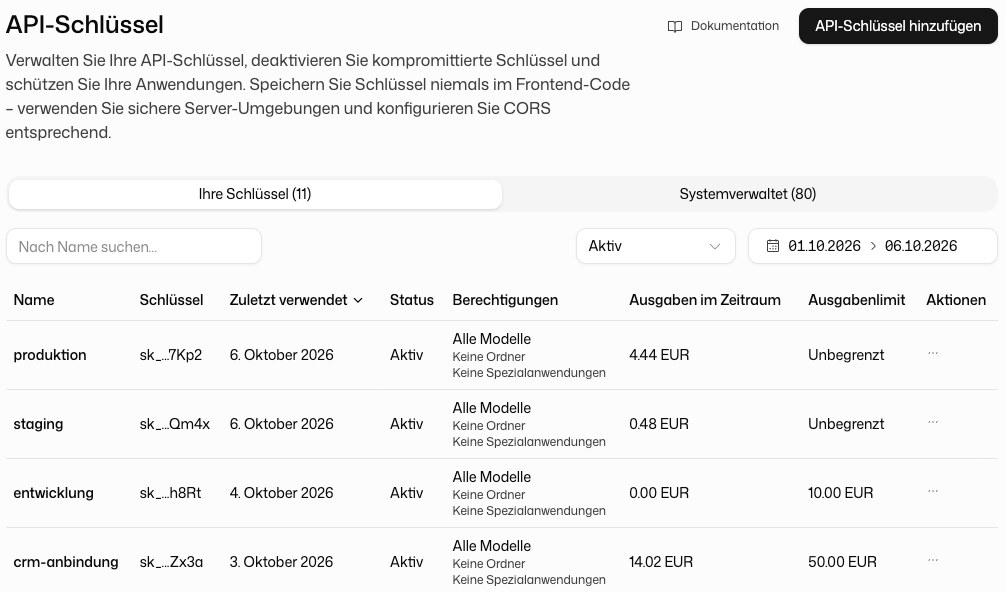
The key list shows each key as Active or Inactive. Use the menu at the end of a row:
- Deactivate suspends a key. Requests with it return
401 Unauthorizeduntil you Activate it again. - Delete disables the key permanently and removes it from the list. Type the key's name to confirm. This can't be undone.
The same menu has Edit permissions and Edit spending limit.
Find a key
- Your keys lists the keys people created. System-managed lists keys that DeutschlandGPT creates for its own features. Their permissions can't be changed.
- Search by name, filter by State, and sort by name, Last used or Spend in Period.
- The period selector sets the time range for the spend column, for example This month or Last 30 days.
In an organisation, administrators with full rights see every key of the workspace. Everyone else sees only the keys they created.
Usage per key
Usage breaks spending and tokens down by key, so you can see which integration consumes the most. More in Dashboard.
Security recommendations
- One key per application. Separate keys per service or environment let you revoke one without touching the others.
- Never commit keys to source control. Keep them in environment variables or a secrets manager.
- Never put a key into browser code. Anyone who opens the page can read it.
- Rotate regularly. Create a new key, switch your application over, then delete the old one.
- Watch the usage. A sudden jump in spend on one key is often the first sign of a leak.