Skill packages
Decide which skill packages and single skills are available to your members
Skill packages bundle ready-made skills for a topic or profession. Under Organization settings → AI & models → Skill packages you decide which packages your members get. You need the permission Manage organization settings. Personal accounts do not have this page.
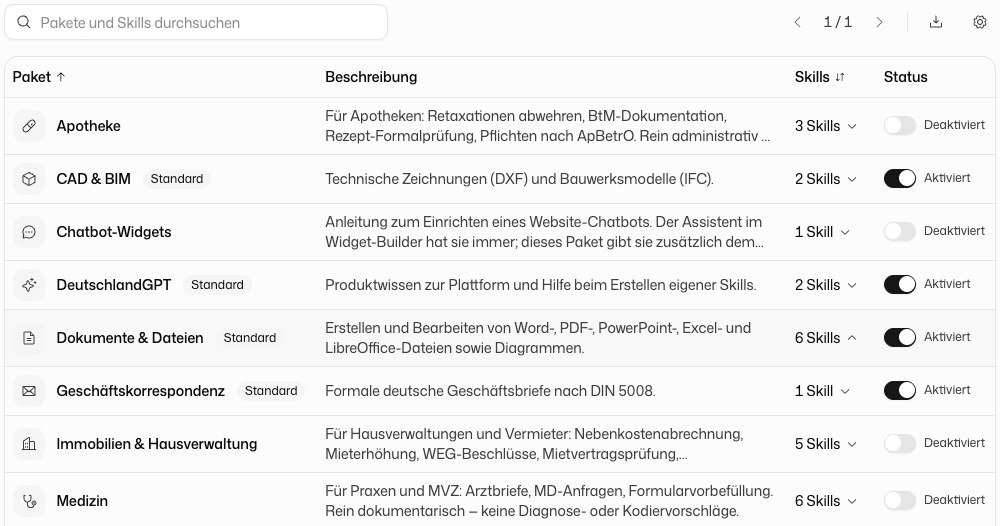
Switch a package on or off
The table lists every package with Package, Description, Skills and Status. The status badge shows Default, Enabled or Disabled. Use the switch in a row to turn a package on or off for the whole organization. Search packages and skills finds a package by its name or by a skill it contains.
Switch single skills
Click a package row to open the list Skills in the "…" package below the table. The arrow next to the skill count turns to show which package is open. In the list you can switch each skill on or off for the organization, independently of the package. Next to each skill a short note explains why it is on or off, for example Enabled by your organization or Active via the package. Click the row again or the × to close the list.
What members can change
Your choice is the starting point for every member. Members can deviate from it in their personal skill settings.
If you activate professional secrecy (§203) and pick your fields of work, the matching packages are switched on for you. You can change that here at any time.