Roles
Create and manage roles to control what members can do within your organization
Roles decide what members may do in DeutschlandGPT. A member can hold several roles. Permissions add up: if any of a member's roles grants a permission, the member has it. You manage roles under Organization settings → Members & access → Roles.
Role list
The table shows each role with its Name, the number of Members and its Type. Search roles … finds a role, and the Type filter shows only System or only Custom roles. Click a row to open the role. The … menu at the end of the row offers Edit (View for a role that cannot be edited) and, for custom roles, Delete.
System roles
Two roles exist in every organization and cannot be deleted:
| Role | Description |
|---|---|
| Admin | Full access, including permissions added in the future. The role cannot be edited. |
| User | The default role for regular members. You can change its permissions, but not delete the role. |
The Admin role shows the notes System-Role and Not editable. If you need a similar set of rights, create a new role.
Create a custom role
Click Create Role. The new role opens, and you enter a Name and an optional Description. After saving, the role page shows the permissions and the members who hold the role. Custom roles can be deleted at any time, for example with Delete in the role's … menu. Everyone who held a deleted role loses it.
Set permissions
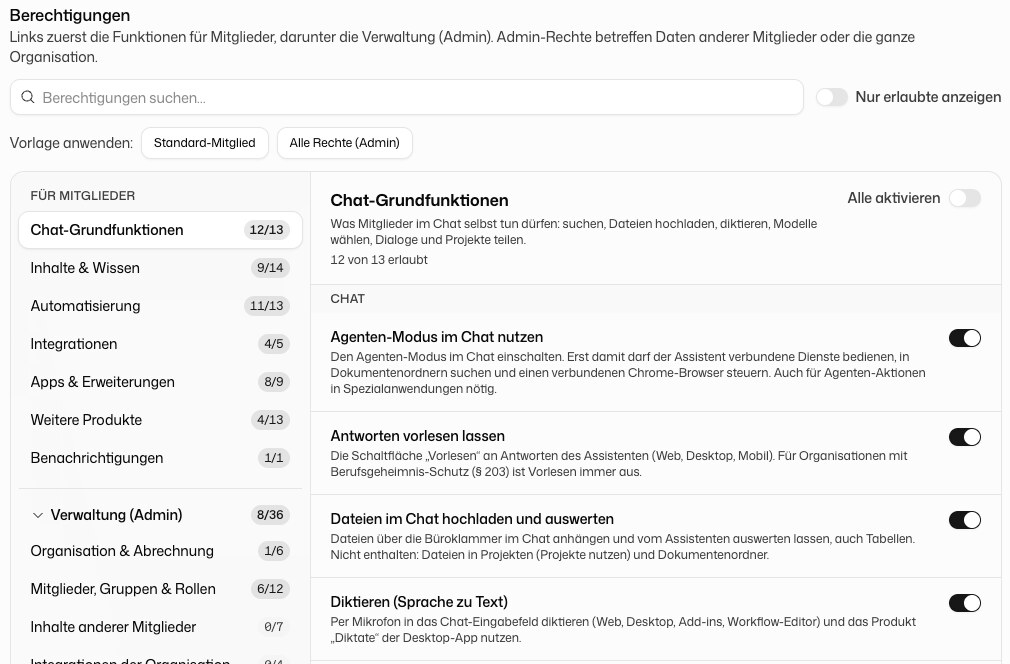
The permission editor has two areas:
- For members: features that members use for their own work.
- Administration (Admin): rights over other members' data or the whole organization. This area stays collapsed until you expand it.
Each area is divided into sections. The counter next to a section, for example "4 of 6 allowed", shows how many of its permissions are on. Enable all switches on every permission in a section.
To find a permission quickly, type into Search permissions… or turn on Show allowed only. Every permission carries a short explanation in the editor.
Start from a preset
Apply preset: resets a role in one step:
- Standard member: the same rights the predefined User role gets by default.
- All rights (Admin): every permission visible on the page, including all admin rights.
Before anything changes, a dialog tells you how many permissions will be added and removed. Products that are not enabled for your organization stay untouched.
Assign a role
On the role page, click Add under Members and pick people or groups. When you pick a group, its current members receive the role once. Later changes to the group do not affect the role.
To take a role away, click Revoke role in the member's row. You can also change a single member's roles on the Members page.
When a permission is missing
A missing permission hides things rather than explaining itself: the sidebar entry is absent, a button is missing or disabled, or the page shows "not found" or "no access" when opened directly. There is no "request access" button. Members ask an administrator, who either grants the permission on one of their roles or assigns them a role that has it. Withdrawing a permission takes effect immediately, also for someone who is already signed in. In the desktop app, running a command on the user's own computer depends on "Use Code in the desktop app" in both CoWork and Code; someone with CoWork but without Code keeps all file and document tools there, just without running commands.
A role answers what a person may do in general. Whether they may open one particular Custom AI Application, folder or project is decided on that item itself, see Sharing individual items.
Not to be confused with Settings → Permissions in a member's own account: that page sets what the assistant may do on their behalf without asking each time, and has nothing to do with roles.
Sharing individual items
Custom AI Applications, skills, document folders, projects, workflows and prompt templates each have their own share dialog (Share, in some editors Manage Access). There you grant access to individual users or groups:
| Level | Meaning |
|---|---|
| Edit | May change the item and share it further |
| Read | May open it; for an application or a skill: may use it |
| No access | No access through this entry |
Prompt templates and shared chats can only be shared read-only. A connected integration account is shared as Can use.
To make a single item available to everyone, share it with the All Users group as Read. That makes this one application usable for the whole organization without letting anyone use all of their colleagues' applications.
- Grants add up and the strongest wins. Someone with Read directly and Edit through a group has Edit.
- A grant is always made on the item, in its share dialog. Creating a group changes nothing until the group is added there.
- Only the owner or someone with Edit can share, and only if their role includes sharing for that kind of item (for example "Share applications"). Without it the share option is missing.
Suspended account or organization
If DeutschlandGPT has suspended an account or a whole organization, the person can still sign in, but every page shows a single card headed Account suspended or Organization suspended, with the reason. Chat, API, workflows and the apps stop working. Unlike a missing permission, which hides individual entries, the card replaces everything.
No administrator of the organization can lift a suspension, and changing roles or groups does not help. It is managed centrally by DeutschlandGPT: follow the reason on the card or contact support. Organizations with an Enterprise contract see an entry in the audit log; the actor is shown as DeutschlandGPT, and an entry for a single member does not repeat the reason that member was shown.
Permission reference
The editor only shows permissions for products your organization has. The tables below list the permissions every organization sees.
For members
Chat basics
| Permission | What it allows |
|---|---|
| Use web search in chat | Let the assistant search the web and read web pages |
| Upload and analyse files in chat | Attach files with the paperclip and have them analysed |
| Use the Generated files page | Show the page with files the assistant has generated |
| Choose the AI model | Pick a different model in chat and set personal default models |
| Dictate (speech to text) | Dictate into the composer by microphone |
| Have answers read aloud | The read-aloud button on answers |
| Use agent mode in chat | Let the assistant operate connected services and search document folders |
| Share own chats | Share a chat by link with people in the organization |
| Share own chats publicly | Share a chat by a public link that works without an account |
| Use projects | Open chat projects and work in them |
| Create new projects | The "New project" button |
| Share own projects | Share a project with people or groups |
| Apply the organization glossary in chat | Apply the organization glossary automatically in your chats |
Content & knowledge
| Permission | What it allows |
|---|---|
| Create own document folders | Create document folders and upload files into them |
| Use document folders | The document folders page and the folder picker in chat |
| Share own document folders | Share a folder with people or groups |
| Create own GPTs | Create, duplicate or adopt Custom AI Applications |
| Use GPTs | Use your own and shared Custom AI Applications |
| See the GPT template gallery | Browse the template gallery |
| Share own GPTs | Share an application with people or groups |
| Publish GPTs as organization templates | Put an own application into the organization's gallery |
| Create own skills | Create or upload skills |
| Share own skills | Share a skill with people or groups |
| Create own prompt templates | Create prompt templates |
| Share own prompt templates | Share a prompt template (recipients can read it) |
The gallery permissions are separate from "Use GPTs": a role can browse the gallery without building its own applications. Adopting a template additionally needs "Create own GPTs".
Automation
| Permission | What it allows |
|---|---|
| Create and manage scheduled tasks | Let the assistant run tasks on a schedule |
| Use Workflows (open the product) | Open Workflows and see own and shared workflows |
| Create own workflows | Create, import or duplicate workflows |
| Edit workflows | Edit and publish own workflows and those shared with edit access |
| Run workflows | Start and cancel workflows and confirm approvals in them |
| Delete own workflows | Delete workflows you created |
| Share own workflows | Share a workflow with people or groups |
| Publish workflows as organization templates | Save a workflow as a template for the whole organization |
Integrations
| Permission | What it allows |
|---|---|
| Connect and use own integrations in chat | Connect own accounts under Account → Integrations and use them |
| Use MCP servers | Use own and shared MCP servers |
| Add MCP servers | Add your own MCP server. Requires "Use MCP servers" |
| Share your own MCP servers | Share MCP servers with people or groups |
Apps & extensions
| Permission | What it allows |
|---|---|
| Use the desktop app | Sign in to the desktop app. Without it, sign-in is not possible |
| Use Cowork in the desktop app | Work with files in shared folders on your own computer |
| Use Code in the desktop app | Work in shared project folders and run commands on your own computer |
| Use the Word add-in | Sign in and chat in the Word add-in |
| Use the Excel add-in | Sign in and chat in the Excel add-in |
| Use the PowerPoint add-in | Sign in and chat in the PowerPoint add-in |
| Use the Outlook add-in | Sign in and chat in the Outlook add-in |
| Use the Chrome extension and browser control | The Chrome extension and control of a connected Chrome browser |
Cowork and Code both require "Use the desktop app". With these permissions you can hand local file access only to employees who have been briefed on it.
More products
Holds the permissions of further products your organization has, for example Take learning courses once the learning platform is active.
Notifications
| Permission | What it allows |
|---|---|
| See changelog updates | The "What's new" card in the sidebar and the changelog in the help menu (?) |
If you roll features out to selected employees only, you can hide these announcements for single roles. Feedback, help and incident notices stay visible.
Administration (Admin)
Organization & billing
| Permission | What it allows |
|---|---|
| Manage organization settings | The central organization settings, including SSO, integrations and data retention |
| Manage the organization’s AI models | Decide which AI models are available and add custom models |
| Manage billing and licences | Buy and assign licences, download invoices, manage pay-as-you-go |
| Assign licences | Give licences the organization already owns to members, take them back or move a member into a free licence of another tier, and see each member's usage as a percentage. No purchases, invoices or pay-as-you-go. Grant together with "View the member list" |
| View usage of all members | View and export usage statistics |
| View the audit log | View and export the audit log (Enterprise plan only) |
| Use the Platform API and manage API keys | Open the Platform API and manage API keys |
| Manage credits and spending limits | Buy credits and manage spending limits for the Platform API and Workflows |
"Manage organization settings" is one of the most powerful permissions. Give it only to people who administer the organization.
Members, groups & roles
| Permission | What it allows |
|---|---|
| View the member list | See every member with email, roles and status |
| Invite members | Invite members by email and withdraw open invitations |
| Edit members and assign roles | Change names, activate or deactivate members and assign roles |
| Remove members from the organization | Remove a member permanently |
| View all groups in the organization | See every group and its members |
| Create groups | Create new groups |
| Edit groups and their members | Change groups, their members and features per group |
| Delete groups | Delete a custom group |
| View roles | See roles and their permissions. Also needed to assign a role |
| Create roles | Create new roles |
| Edit roles and their permissions | Change a role's name and permissions |
| Delete roles | Delete a custom role |
"Edit members and assign roles" also allows passing on existing admin roles.
Other members’ content
| Permission | What it allows |
|---|---|
| Add organization glossary entries | Add or duplicate glossary entries |
| Edit organization glossary entries | Change existing glossary entries |
| Delete organization glossary entries | Delete glossary entries |
| Open other members’ skills by link | Open any skill in the organization read-only by its link |
Organization integrations
| Permission | What it allows |
|---|---|
| Create WebDAV connectors | Create a WebDAV file connector, for example for Nextcloud |
| Edit the organization’s WebDAV connectors | Edit any WebDAV connector, including other people's |
| Delete the organization’s WebDAV connectors | Delete any WebDAV connector, including other people's |
Manage products organization-wide
Holds the admin rights of further products, for example assigning learning courses and viewing learning progress. See Learning.