Permissions
Decide what DeutschlandGPT has to ask you about before it reads from or writes to your connected services, and what may run without asking.
Settings → Permissions is the page for "why does it keep asking me?". Here you decide what DeutschlandGPT must ask you about every time and what it may do without asking. What you set here applies to every chat.
The page only covers actions in connected services and the sandbox. DeutschlandGPT's built-in features, such as creating files or generating images, never ask. Your role decides whether you may use them.
Defaults
Three rows set the baseline for everything you don't configure differently further down:
| Setting | Covers | Options |
|---|---|---|
| Read from connected services | Searching e-mail, opening files, viewing calendar events | Always allow, Ask every time |
| Write to connected services | Sending e-mail, uploading files, changing tickets | Always allow, Ask every time, Never allow |
| Reach websites from the sandbox | Fetching external pages while code runs | Ask every time, Never allow |
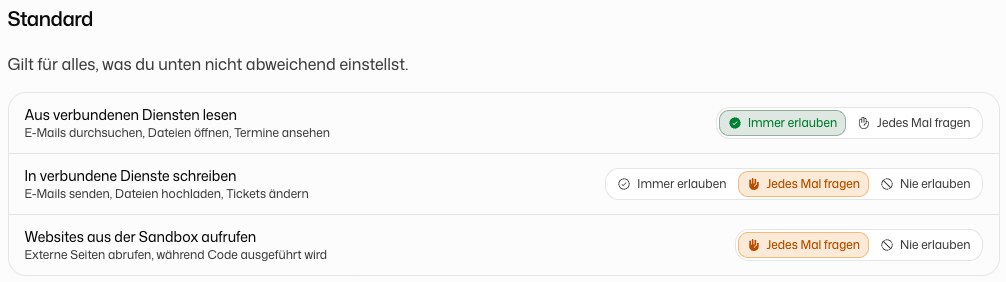
With Ask every time, the chat shows an approval card before the action runs. See Approve actions.
Connected Services
Below the defaults, every connected service is listed with its current state, for example Follows your default or Everything always allowed. Click a service to set something different for it:
- Whole service: one setting for every action of this service.
- Reading actions and Writing actions: a setting for each single action. A single action overrides the setting for the whole service.
So you can, for example, let the model read your Outlook mailbox without asking but still have it ask before every mail it sends.
When you choose Always allow on an approval card in the chat, the grant lands here too. To take it back, set the action to Ask every time again.
Browser
If you use the browser extension, this section lists the browser actions you allowed for every chat with Always allow. Remove an entry to be asked again. Anything you allowed only for one chat is not listed here, because it ends with that chat.
Allowed Websites
The sandbox may reach the hosts in this list without asking. Enter a hostname without https://, path or port and click Add. An entry like *.example.com allows the domain and all of its subdomains.
Scheduled Tasks
A scheduled task runs without anyone at the screen, so it does not ask. Never allow still applies there. If a task should never send mail or change something in a service, set that service, or writing in general, to Never allow.