Audit Log
Searchable record of security-relevant actions in your organization
The audit log is available on the Enterprise plan (sales-managed) only.
The audit log under Organization settings → Security & compliance → Audit Log is a searchable record of security-relevant actions in your organization. It answers who did what, and when. You need the permission View the audit log.
Narrow the log with filters
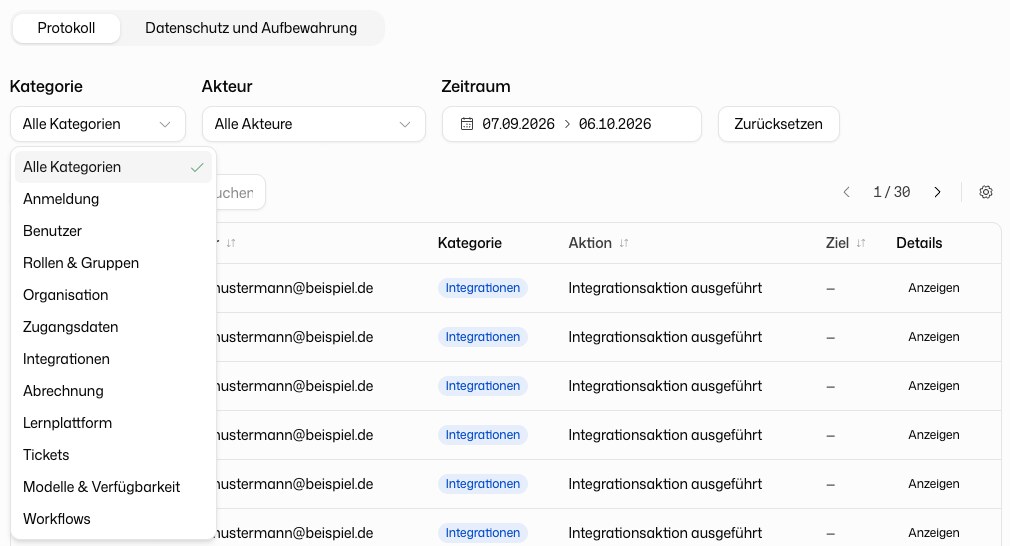
| Filter | Description |
|---|---|
| Category | The area an action belongs to, see below |
| Actor | The person who performed the action |
| Date range | Quick select for Today or the Last 7, 30 or 90 days, or any range. Reset returns to the default |
The search field matches free text against actor and action.
The categories are Sign-in, Users, Roles & groups, Organization, Credentials, Integrations, Billing, Learning, Workflows and Models & availability.
Read the log table
| Column | Description |
|---|---|
| Timestamp | When the action was recorded |
| Actor | The person who performed the action |
| Category | The area the action belongs to |
| Action | What was done, for example a role being assigned |
| Target | The object or person affected, if any |
| IP Address | The address the action came from |
| Details | View opens the full event with all recorded metadata |
You choose the visible columns and rows per page under the table preferences.
Privacy and retention
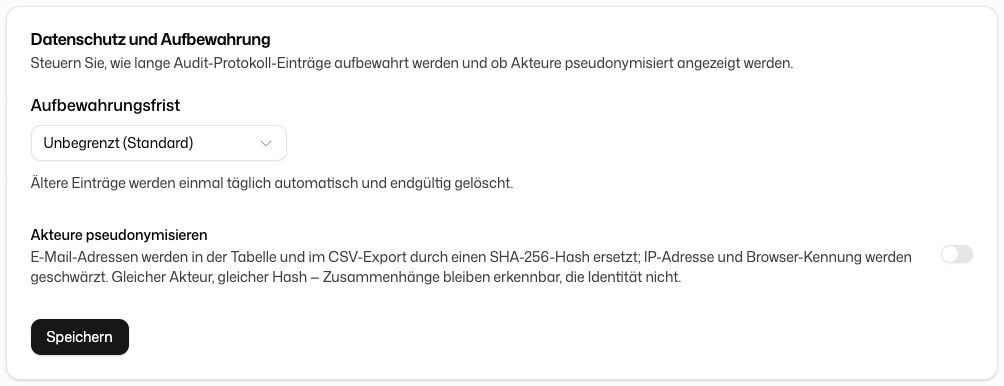
Members with the permission Manage organization settings see a second tab, Privacy and retention:
- Retention period: how long entries are kept. The default is Unlimited (default). With a period set, older entries are deleted automatically and permanently once a day.
- Pseudonymize actors: email addresses in the table and the CSV export are replaced with a SHA-256 hash, and IP address and browser identifier are redacted. The same actor always gets the same hash, so you can still see connections between entries without seeing who it was.
Export the log
Click Export CSV at the top right to download the log. The CSV suits compliance audits, incident investigations and external reporting.
The audit log records administrative and security-relevant actions only. It never contains the content of conversations.